New features, shipped often. Here’s everything that’s landed in BakeryMS — newest first.
NEW
Visit ratings and two-way customer messaging
Right after a stamp lands, the loyalty app asks how the visit was — and customers can message your bakery from their card, with your replies arriving on their phone as a push.
A rating at the right moment — the app asks just after a stamp is collected, at most once a week per card. Every rating is tied to a real visit, so the score can’t be stuffed.
Reviews at a glance — the new Reviews page shows your average with its trend, the star distribution, a per-shop breakdown and the latest comments, so a slipping shop shows up as a number instead of a feeling.
Nothing slips past unanswered — a comment opens a conversation automatically, and so does a low score without one. You reply straight from the review.
One inbox, one thread per customer — questions, rating comments and your replies live in a single conversation per customer. They write from their card in the app; your reply reaches their phone as a push notification.
You stay in control — the rating prompt is one switch under Loyalty → Stamp rules, and messaging only works with customers who hold your card.
A tidier Loyalty area — the section now has its own side menu: overview, inbox and reviews up top, marketing tools in the middle, and set-up pages (card & rewards, card design, stamp rules, locations, NFC tags) each on their own page.
NEW
Compare any period against the one before
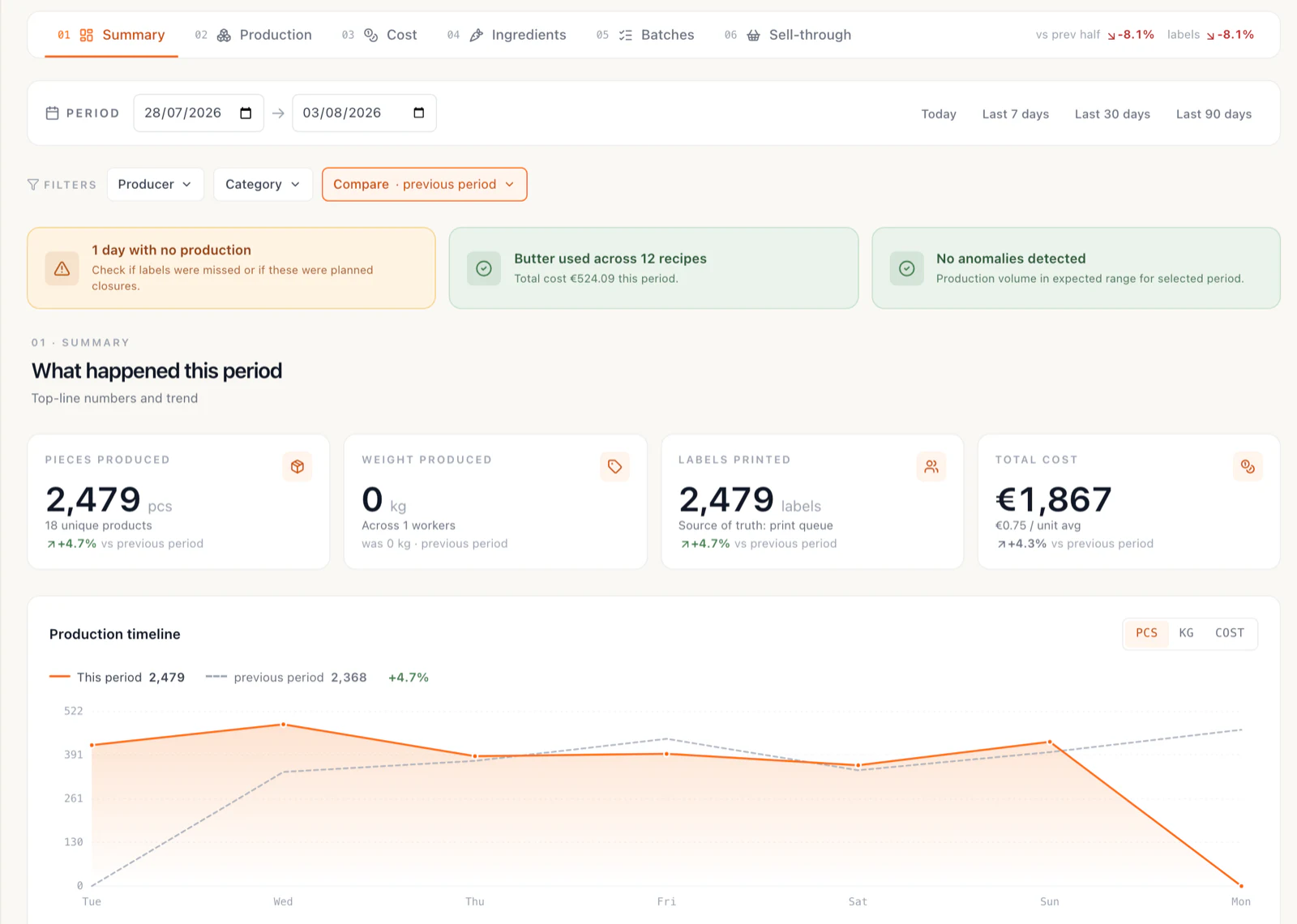
The Production and Waste reports now open with this week already sitting next to last week — every headline number carries its change, and the timeline draws both periods at once.
On before you ask — the Summary tab arrives already comparing against the previous period, because a week’s numbers mean little without a baseline. Switching it off is one click.
Four ways to compare — the previous period, the previous month, the same period last year, or any start date you pick yourself; the chip always names the window it’s measuring against.
A change on every headline number — pieces produced, weight, labels printed and total cost each show how they moved against the compared period, so you never have to open two tabs and do the arithmetic.
Both periods on one timeline — the chart draws the compared period as a dashed line behind the current one, and the legend totals them side by side. A good week and a bad week are one glance apart.
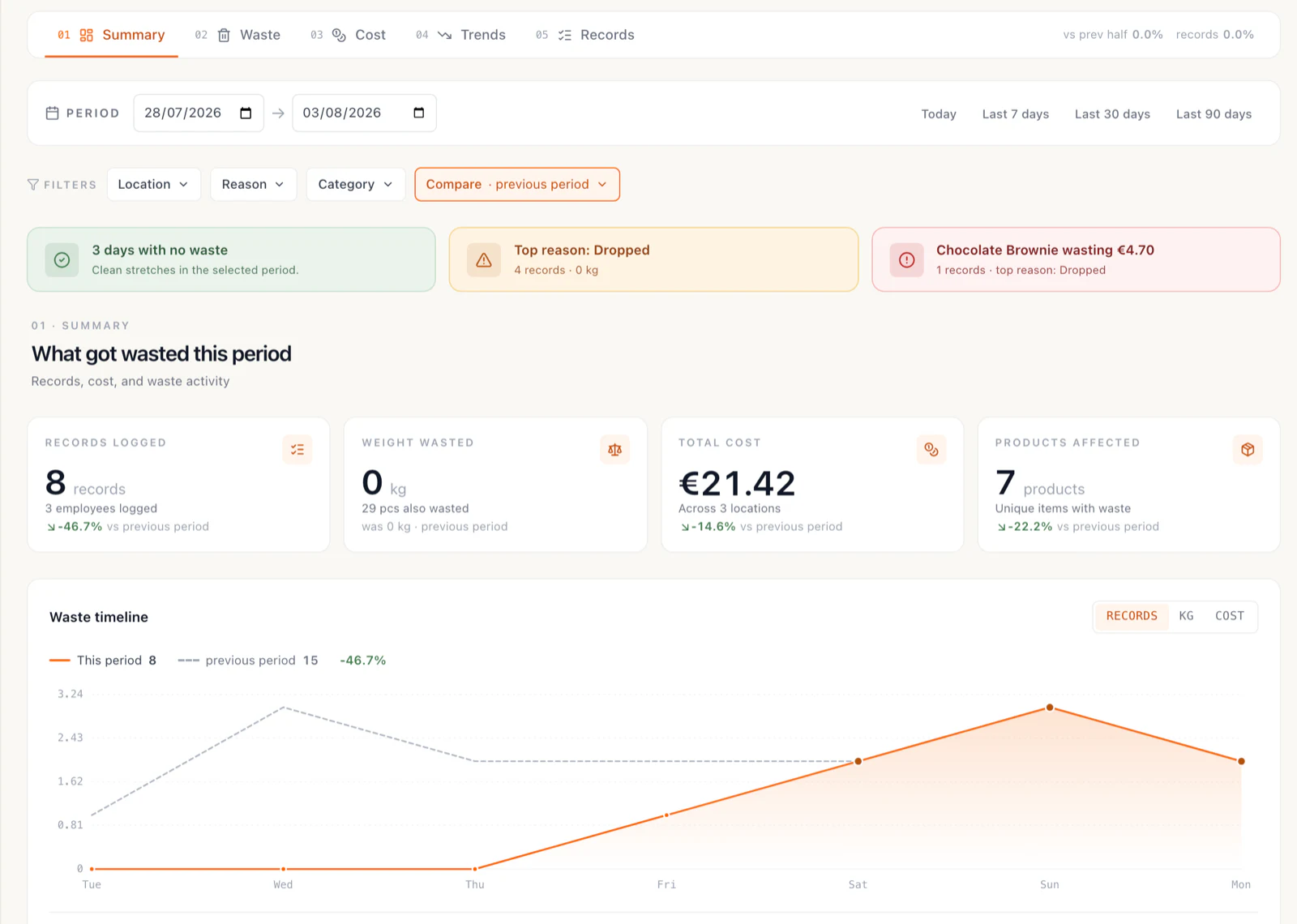
The same treatment for waste — records logged, weight wasted, total cost and products affected all compare too, so a week of tighter waste control shows up as a number instead of a feeling.
Narrow it before you compare — the Summary tab now has its own filters (producer and category on production; location, reason and category on waste), and they apply to the headline numbers, the chart and the comparison together.
Tick everything first, reload once — the filter menus let you pick several producers or categories before the report goes and fetches, instead of reloading after every single tick.
Production Report — Summary, compared against the previous periodWaste Report — the same comparison, on a week with 46.7% fewer waste records
NEW
New Items — everything that just arrived in your catalog
Every product, ingredient and packaging item added to your catalog — most of them created straight off a scanned invoice — now sits on one page, newest first.
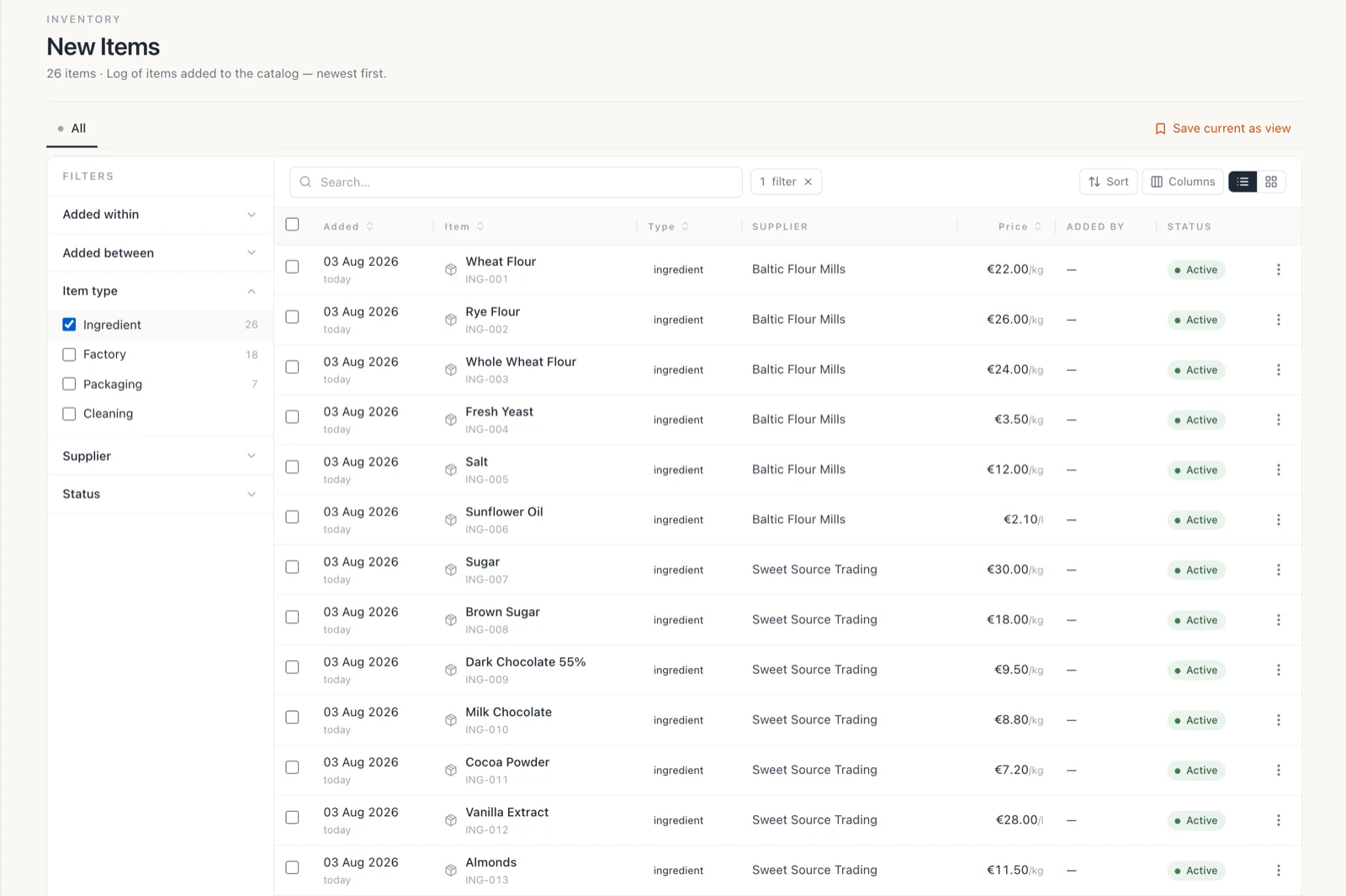
One page for new arrivals — Stock → New Items lists everything added to the catalog with the day it appeared, its type, its supplier, its purchase price and whether it’s still active.
Mostly born from invoices — when the invoice parser meets a line it has never seen and you turn it into a product, that item lands here. Nothing joins your catalog without leaving a trace.
Retire the old ingredient without opening a single recipe — a row expands in place into “replace an ingredient with this item”: search the ingredient your recipes still point at, see how many lines and which recipes use it, and move all of them over to the new item in one go. Tick the box and the old ingredient is deactivated at the same time.
Guard rails on the swap — only ingredients measured in the same stock unit can be chosen, and recipe costs recalculate themselves afterwards, so consolidating two spellings of the same thing can’t quietly re-cost your products.
Filter by age — added today, in the last 7, 30 or 90 days, or between two dates you choose.
Filter by type and supplier — ingredients, factory products, packaging or cleaning supplies, narrowed to the supplier that brought them in, with a live count next to each.
Views you can come back to — All time, Last 7 days, Last 30 days and New ingredients (30d) are built in, and any filter combination you use every week can be saved next to them.
The New Items log, narrowed to the ingredients that arrived this month
NEW
Adjustable label sizes
Print product labels on any roll — pick a preset or set a custom width and height in millimeters, and the whole label layout, fonts and barcode scale automatically.
Label size setting — Settings → General has a new Label printing section: choose a common size (50×40 mm default, 40×30, 58×40, 58×60, 76×51, 100×50 and more) or enter any custom size in millimeters.
Everything scales automatically — barcode, product name, dates, producer and batch number are re-laid-out for the new size; no manual template work.
Per-station sizes — each computer or tablet remembers its own setting, matching the roll physically loaded in the printer it is connected to.
Quick switch on the factory floor — the label printing page has a size selector right in the header, and the on-screen label preview reflects the size you picked.
One-click test print — print a sample label at the configured size through the print bridge to verify a fresh roll before production.
Printing reliability — printing multiple copies through the desktop print bridge now always prints the full quantity, dropped printer connections recover automatically with clearer error messages, and the print bridge accepts jobs only from BakeryMS on your own computer.
NEW
Min/max stock levels per location
Set Min, Reorder and Max stock levels per product and per location — and let shop order suggestions top up to Max automatically instead of guessing.
Stock limits page — a new bulk editor under Inventory → Stock limits: every product in one grid with Min, Reorder point and Max, editable per location.
Per-location overrides — set one default for all locations, then override only the shops that differ; a small kiosk and your busiest shop don’t need the same levels.
Order suggestions that follow your limits — switch a category to min/max ordering in Settings → Order categories, and whenever a shop’s stock is at or below the Reorder point the suggested order tops it up to Max.
Mix and match with forecasts — categories you leave off (and products without a Max) keep the demand-forecast suggestions, so you can run min/max for packaging and long-life goods while fresh goods stay forecast-driven.
Suggestions arrive in the shop’s order unit — limits are kept in stock units, but the suggested quantity converts to the boxes or packs the shop actually orders.
NEW
Generic ingredients
One ingredient, any brand — recipes reference a single canonical ingredient while every supplier brand feeds it its own latest price.
One ingredient, any brand — create a generic ingredient (e.g. “Eggs”) and link every brand item you actually buy to it; each brand keeps its own pack size, supplier, and price history.
Recipes never need editing again — recipes reference the generic, so you can switch brands, change suppliers, or buy whatever’s cheapest this week without touching a single recipe.
Latest purchase wins — the moment an invoice is approved, the newest brand’s price (normalized per piece or kg, whatever the pack size) flows to the generic and every recipe re-costs automatically.
One-click recipe migration — when you link a brand, the system offers to move every recipe using that brand over to the generic instantly, with zero cost drift.
Works from the very first invoice — even a brand-new item created straight from an unmatched invoice line starts feeding the generic as soon as its invoice is approved.
Built-in guardrails — unit mismatches (kg vs pieces) are blocked at link time, invoice lines still match at the brand level so per-supplier price analytics stay intact, and egg-to-grams conversion lives on the generic so gram-based recipes cost correctly.
NEW
Margin protection
See every product’s real margin — waste included — against its target, reprice in one click, and get warned the moment an invoice pushes a product below target.
Margin Leaks report — a new report under Reports → Margin Leaks showing every product’s real margin (including what you lose to waste) against its target, ranked by how many € per week each underpriced product is costing you.
Target margin per product — set your own margin target on any product directly in the report (defaults: 60% for own production, 30% for resale items).
One-click repricing — each product below target shows a suggested new price you can apply with a single click.
Price-shock warning on invoice approval — when you approve a supplier invoice where an ingredient got noticeably more expensive (≥5%), the system immediately warns you which products just fell below their target margin.
Margin alerts (push notifications) — a new “Margin below target” notification fires after an invoice approval that hurts margins, plus a nightly check every morning at 07:45 that summarizes total € being lost per week. Can be turned on or off per user in notification settings.
Margin Leaks dashboard widget — add it via Dashboard → Edit → widget catalog for your top 5 margin leaks and total €/week at a glance.
More accurate waste costs — waste is now valued at the product’s cost on the day it was written off, so historical waste reports no longer shift when ingredient prices change.
NEW
AI sales predictions
Tomorrow’s bake, forecast per shop and product from your own sales history.
NEW
Invoice scanning
Photograph a supplier invoice and let AI update your ingredient costs automatically.
IMPROVED
Faster production sheets
Bake lists now load instantly and group by station, so the morning starts calmer.
NEW
Web ordering
Take orders online that flow straight into the same queue as the counter.